MANUAL mode is similar to AUTO mode but only executes 1 iteration of the tab algorithm. MANUAL mode lets you select the exact strings you want to play a chord on and attempts to find tabs.
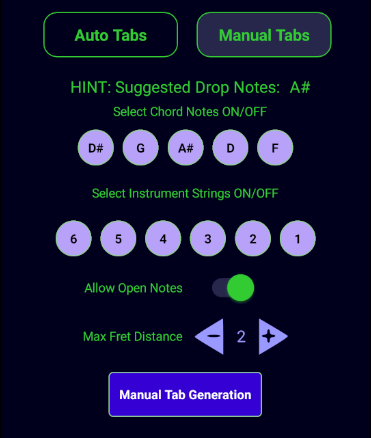
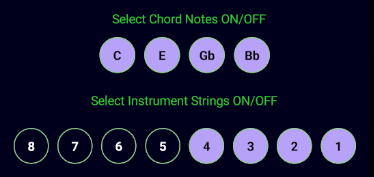
MANUAL mode, like AUTO mode, will RESET to a default configuration whenever you select a new Root Note, Chord, Instrument or Tuning. Its default configuration will be to select as many strings in the instrument as there are Chord notes. If there are more notes than strings then the Drop notes assigned to the Chord will be turned OFF until Notes ON == Strings ON.
Example: 4 Notes: 8 Strings
Example: 6 Notes: 4 Strings
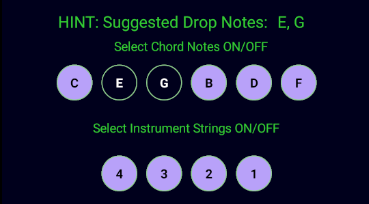
If you select more Chord notes than Instrument Strings you will get a warning message because it will not find any results.

MANUAL mode does not have a [Standard Chord Shape] toggle because you have direct control over the strings to select. MANUAL mode will always drop notes in default configuration if neccessary to guarauntee results.

The Open Notes toggle tells the algorithm to find tabs that has notes in the chord tab that are not fretted.
Example: D# maj7: 4 Notes: Strings "4 3 2 1": Max Fret Distance = 2: Open Notes ON
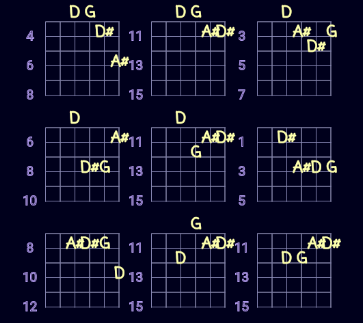
Example: D# maj7: 4 Notes: Strings "4 3 2 1": Max Fret Distance = 4: Open Notes OFF
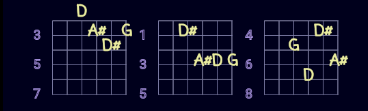
Note the first tab still shows a chord with one Open Note even though the toggle is OFF. This is because that tab fits within the Max Fret Distance of 4.
Open Notes (notes with no fret) will always be displayed above the TAB diagram.
The tab algorith will always display a chord with an Open Note if it meets the [Max Fret Distance] criteria regardless of the [Open Note] toggle settings.
The TAB diagram will always display the lowest fretted string in the tab on the 2nd line of the tab. The first line is always considered the instrument nut bar (0 fret).

Max Fret Distance determines the maximum distance between the lowest fret and the highest fret in a given tab that the algorithm will discover.
Sometimes you will notice that the value of Max Fret Distance increase by 1 when you select the Tab Generate button. This is because the algorithm found no results at the current value and so it will iteratively increased the [Max Fret Distance] by 1 until it finds results.
In AUTO or MANUAL mode the [Max Fret Distance] value will be increased by 1 if it does not find any results. It will continue this iteration until results are returned or it hits a nax value of 4.